Case Details
Product: Eatorant
Built By: Stealth Technocrats Pvt. Ltd.
Type: Multi-Vendor SaaS — Own Product
Target Audience: Restaurant Owners, Café Owners, Food Truck Owners, Fast Food Chains, Bakeries, Cloud Kitchen Owners, Restaurant Managers
Core Modules: QR Ordering, POS Billing, Kitchen Management, Inventory Management, Table Management, Sales Reports
Order Management: Real-Time Kitchen Display & Kanban Workflow
Billing: Integrated POS — Auto-Generated Bills Per Table & Order
Inventory: Auto-Updated on Every Order in Real Time
Reporting: Live Sales Reports & Business Analytics
Frontend: EJS (Server-Side Rendering)
Backend: Node.js
Database: MongoDB
Download Case Details
Reporting: Live Sales Reports & Business Analytics
Download a detailed report on this case
Let’s Work Together for Development
Call us directly, submit a sample or email us!
Address Business
Call Us
+91 90566 66655
Working Time
Holiday : Closed
About the Product
Eatorant is a complete all-in-one restaurant management platform built in-house by Stealth Technocrats Private Limited.
It was built to solve the single biggest problem every food business faces — running too many disconnected systems at the same time. A separate POS for billing. A separate system for kitchen orders. Manual inventory tracking on spreadsheets or paper. No real-time visibility into table status or sales performance. Every part of the operation running in its own silo, creating gaps, errors, delays, and revenue loss every single day.
Eatorant brings every one of those functions onto one unified platform — and connects them so they work together automatically.
When a customer sits at a table and scans the QR code placed there, they browse the menu and place their order directly from their phone. The moment that order is placed, three things happen simultaneously and automatically — the kitchen receives the order instantly on a live display, the billing system generates the bill in real time, and the inventory is updated to reflect what has been consumed. No staff member needs to carry a chit to the kitchen. No one needs to manually calculate a bill. No one needs to update a stock register at the end of the day.
Everything happens in one flow. One scan. One order. Everything updated.
Eatorant is built for every food business that wants to run faster, serve better, waste less, and grow with full visibility into their own operations — whether they run a single café, a fast food chain, a cloud kitchen, a bakery, or a food truck.
Scan. Order. Enjoy — That’s Eatorant.
Platform Roles
The system was designed around three clearly distinct roles, each with its own interface, permissions, and workflow:
| Super Admin | The super admin oversees and controls the entire Eatorant ecosystem. They onboard and manage all food businesses listed on the platform, review and approve registrations, manage credentials, and maintain full platform health. The admin has complete visibility into every business, every module in use, every live order, every table status, every inventory movement, and every sales report across the entire platform at all times. |
| Food Business Owner | Every food business owner — whether running a restaurant, café, bakery, fast food chain, food truck, or cloud kitchen — gets their own fully isolated dashboard and branded digital storefront. From their dashboard they manage their menu, configure their tables, monitor kitchen operations, track inventory levels, view sales reports, and oversee every aspect of their business in real time. All six core modules — QR ordering, POS billing, kitchen management, inventory, table management, and sales reports — are available from one single dashboard without switching between systems. |
| Customer (End User) | Customers interact with Eatorant through the simplest possible experience. They sit at a table, scan the code placed there, and the food business's branded menu opens instantly in their mobile browser. No app download. No lengthy sign-up. They browse the menu, place their order, and from that moment everything else is handled automatically by the platform — kitchen, billing, and inventory all update in real time without any staff needing to intervene manually. |
The Problem
Food businesses across India — restaurants, cafés, food trucks, bakeries, fast food chains, and cloud kitchens — are operationally complex by nature. Every service involves multiple moving parts working simultaneously. And for most food businesses, those parts are disconnected from each other, creating a daily cycle of manual work, human error, and operational chaos that costs them money, customers, and growth.
| Every Operation Running in a Separate Silo | Most food businesses run their billing on one system, their kitchen on verbal communication and handwritten chits, their inventory on a spreadsheet or paper register, and their table management in someone's head. None of these systems talk to each other. Every order requires a staff member to manually carry information from one part of the operation to another — and every handoff is an opportunity for something to go wrong. |
| Billing Was Slow, Manual, and Error-Prone | Calculating bills manually at the end of a meal — especially during peak hours with multiple tables active — was a consistent source of errors, disputes, and delays. Customers waited too long for their bill. Staff made mistakes under pressure. Revenue was lost to miscalculations that went unnoticed. |
| Kitchen Communication Was Chaotic | Orders were communicated to the kitchen verbally or through handwritten chits carried by floor staff. During busy service, orders got mixed up, items were missed, and preparation happened out of sequence. There was no single place where the kitchen could see every active order at once — organised, prioritised, and clearly trackable. |
| Inventory Was Never Accurate in Real Time | Stock levels were updated manually — at the end of the day, or whenever someone remembered. This meant businesses were routinely running out of items mid-service without warning, over-purchasing stock they did not need, and losing money to waste and theft that went untracked because there was no real-time visibility into what was being consumed with every order. |
| Table Management Was Guesswork | Floor staff managed table status — occupied, available, billed, waiting — through memory and verbal updates. During a busy service, this created constant confusion. Tables that had paid were not cleared fast enough. Available tables were not assigned quickly. Customers waited longer than necessary and the business lost table turns that directly impacted revenue. |
| No Real-Time Visibility into Business Performance | Food business owners had no live view of how their business was performing during service. Sales data was compiled manually at the end of the day or week — too late to act on, too approximate to trust, and too disconnected from actual order and inventory data to be genuinely useful for business decisions. |
| No Single Platform Built for the Full Food Business Operation | Every solution in the market addressed one part of the problem. A POS for billing. A kitchen display system for orders. A separate inventory tool. A table booking app. Food business owners were paying for multiple tools, training staff on multiple systems, and still dealing with the gaps between them. There was no single platform that brought everything together and made it work as one connected operation. |
The Solution
Stealth Technocrats built Eatorant as a complete all-in-one restaurant management SaaS platform using Node.js, EJS, and MongoDB — designed from the ground up to connect every part of a food business operation into one unified, automated, real-time system.
The core principle behind every design and development decision was simple — when a customer places one order, every part of the business that needs to know about it should know about it instantly, automatically, and without any manual intervention from staff.
That principle is what makes Eatorant different from every point solution in the market. It is not a billing tool with some extra features. It is not a kitchen display system with an ordering module bolted on. It is a fully integrated operating system for food businesses — where every module is connected to every other module and every action in one part of the system automatically updates every other part in real time.
| EJS Templates | Server-side rendered views for the food business owner dashboard, restaurant manager interface, customer-facing storefront menu pages, kitchen display, and admin panel. Fast initial load, mobile-optimised, and built for reliable performance across all devices and connection speeds. | |
| Node.js Backend | Event-driven server architecture handling the full operation — menu management, QR-based ordering, real-time kitchen updates, POS billing generation, automatic inventory deduction, table status management, sales data aggregation, and multi-role access control — all running simultaneously on one backend. | |
| MongoDB | Flexible document model storing food business profiles, dynamic menu structures, real-time order records, billing data, inventory levels and movement logs, table configurations and status, sales reports, and per-business theme configurations — all cleanly isolated per food business on the platform. | |
| QR Code → Browser | The platform's core technical achievement. A single customer order triggers a simultaneous cascade of automated updates across kitchen, billing, and inventory — without any manual step required from staff at any point in the flow. | |
| Real-Time Kitchen Display | Orders appear on the kitchen display the instant they are placed, organised by table and time. Kitchen staff work from a live, always-accurate view of every active order without waiting for a chit, a call, or a message from floor staff. | |
| Integrated POS Billing | Bills are generated automatically from the order data the moment an order is placed or updated. No manual calculation. No end-of-meal keying in of items. The bill is always accurate, always ready, and always reflects exactly what was ordered. | |
| Automated Order-to-Operation Flow | The platform's core technical achievement. A single customer order triggers a simultaneous cascade of automated updates across kitchen, billing, and inventory — without any manual step required from staff at any point in the flow. | |
| Live Inventory Engine | Every item on the menu is linked to inventory. Every order automatically deducts the corresponding stock in real time. Business owners and managers see live inventory levels at all times — and the system flags items running low before they run out mid-service. | |
| Table Management System | Every table in the space is configured in the system. Floor staff and managers see the live status of every table — available, occupied, order placed, billed, or ready to clear — from one view, updated automatically as orders and payments move through the system. | |
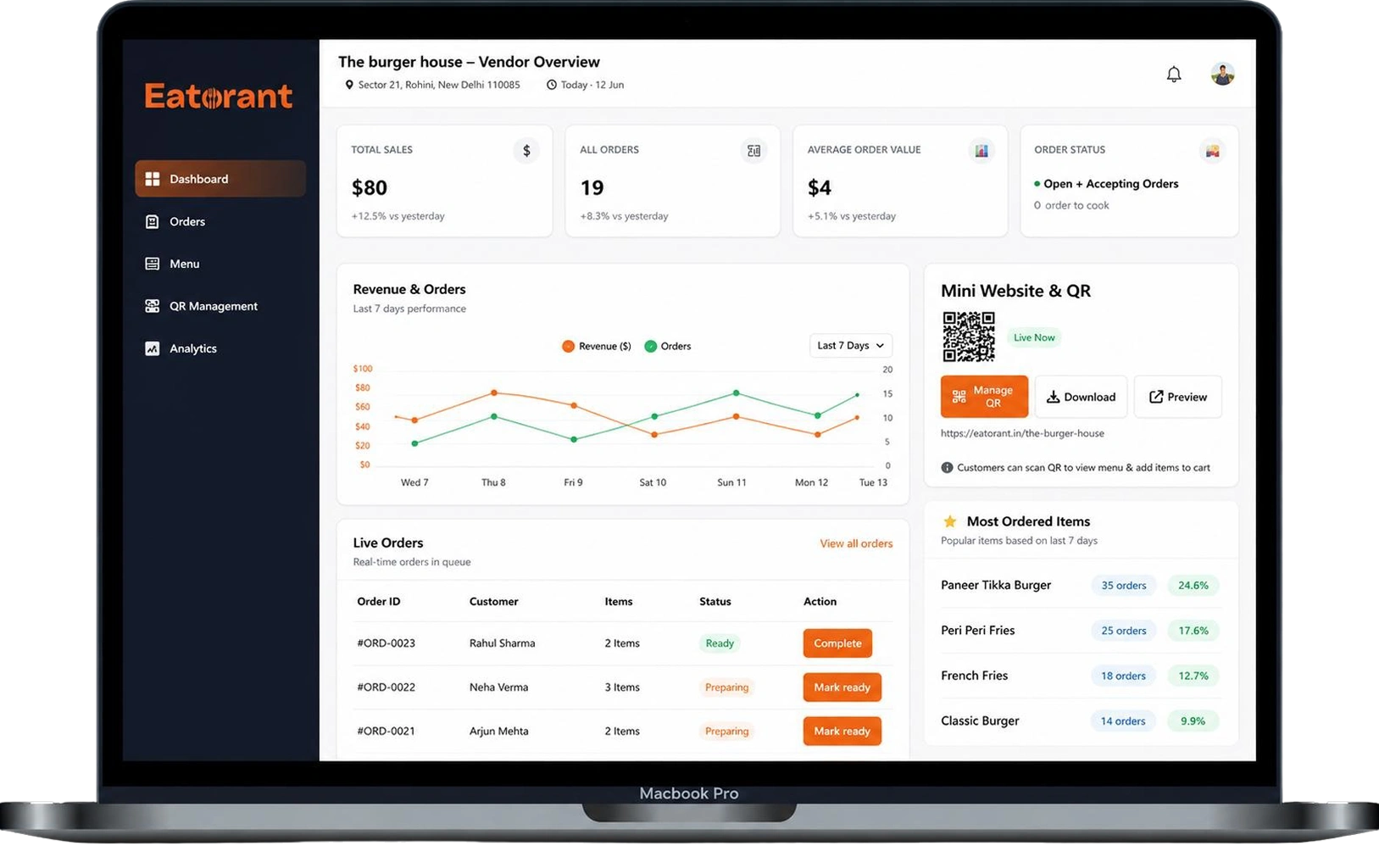
| Sales Reporting Engine | Every order, every bill, and every payment feeds automatically into the sales reporting module. Business owners see live sales data — by item, by table, by time period, by staff — without compiling anything manually. The data is always current, always accurate, and always ready to act on. | |
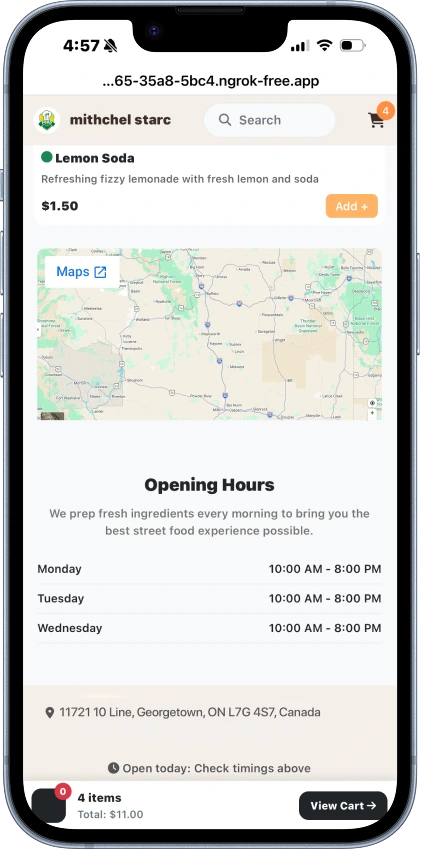
| Per-Business Theme Engine | Per-business theme configuration — colours, fonts, banner images — applied dynamically to the customer-facing storefront so every food business has a digital menu that looks and feels uniquely theirs. |
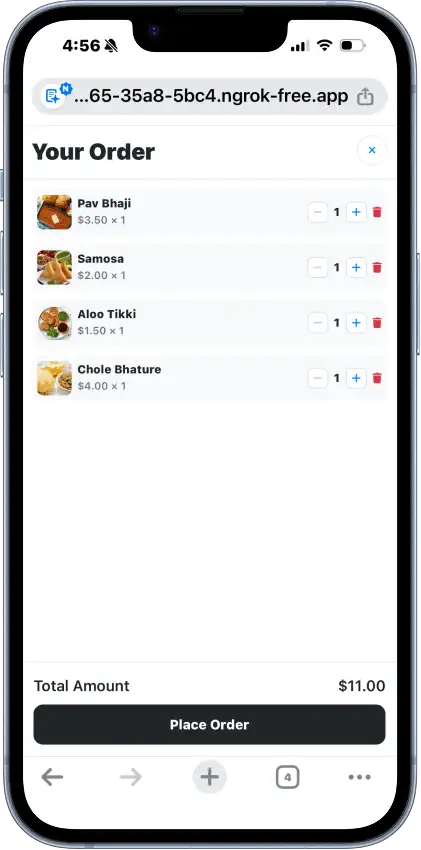
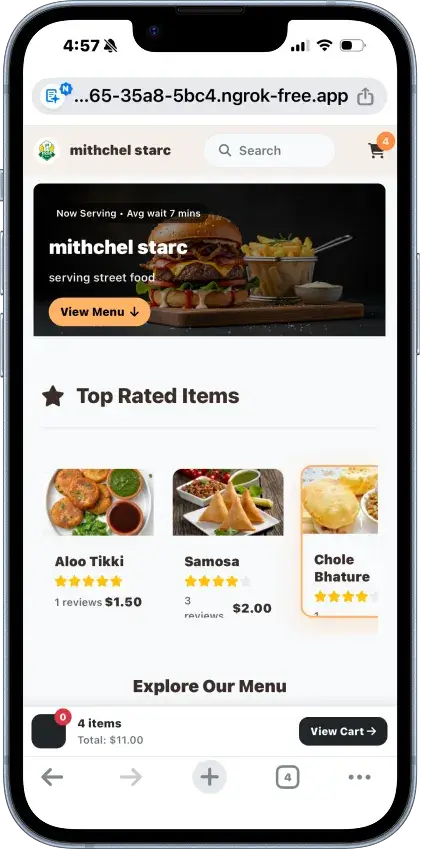
| Module One — QR-Based Table Ordering | Every table in the food business is assigned a unique scannable code — placed on a standee, coaster, or any surface on the table. When a customer sits down and scans the code, the food business's branded digital menu opens instantly in their mobile browser. No app download required. The customer browses the menu, selects their items, and places their order directly from their phone. The moment the order is confirmed, it flows automatically into the kitchen display, the billing system, and the inventory engine — simultaneously, in real time, with zero staff intervention required. For food trucks and takeaway counters, a single business-level code is displayed at the counter. Customers approaching the counter scan it, place their order, and pay — all digitally, before the conversation with staff even begins. Orders arrive at the counter organised, digital, and tracked. |
| Module Two — POS Billing | Eatorant's integrated Point of Sale system eliminates manual billing entirely. Every order placed through the platform automatically generates a bill in real time — populated with the exact items ordered, quantities, prices, applicable taxes, and the table number. When the customer is ready to pay, the bill is already prepared and accurate. There is nothing to key in, nothing to calculate, and no margin for billing errors. Payments are processed directly through the platform. Payment status per table is visible to the food business owner and manager in real time — paid, pending, or partially settled. End-of-day billing summaries are generated automatically from live transaction data — no manual compilation, no reconciliation headaches. |
| Module Three — Kitchen Management | The moment an order is placed at any table, it appears instantly on the kitchen display — organised by table number and time of order. Kitchen staff work from a live, real-time view of every active order across the entire service without waiting for a chit, a phone call, or a message from the floor. Orders move through a defined workflow — Placed, Preparing, Ready, Complete — on a Kanban-style kitchen board. When the kitchen marks an order as Ready, the customer receives an automatic notification on their phone. Floor staff see the update on their view simultaneously. Everyone is working from the same live information at all times — kitchen, floor, and customer — without a single word needing to be exchanged. |
| Module Four — Inventory Management | Every item on the menu is linked to the inventory system. Every time an order is placed and confirmed, the corresponding ingredients and stock items are automatically deducted from inventory in real time. There is no end-of-day stock counting. No manual register updating. No guessing what is left. Business owners and managers see live inventory levels at all times from their dashboard. The system automatically flags items that are running low — before they run out mid-service and before a customer orders something that cannot be made. When an item is marked as unavailable in the menu, it is hidden from the customer-facing storefront instantly. Inventory reports give business owners a clear, accurate picture of consumption patterns, waste, and purchasing needs — so they buy smarter, waste less, and never run short unexpectedly. |
| Module Five — Table Management | Every table in the food business is configured in the Eatorant system — numbered, named, and mapped to the physical layout of the space. From one view, the food business owner and manager can see the live status of every table at any moment — available, occupied, order placed, awaiting payment, billed, or ready to clear and reset for the next customer. Table status updates automatically as orders are placed, meals progress, and payments are completed. Floor staff always know which tables are free, which need attention, and which are ready to be turned. During peak service, this visibility alone reduces the time between a customer leaving and the next customer being seated — directly increasing table turns and revenue per service. |
| Module Six — Sales Reports & Business Analytics | Every transaction that moves through Eatorant — every order, every bill, every payment, every inventory movement — feeds automatically into the sales reporting engine. Business owners and managers see live sales data from their dashboard at any time — without compiling spreadsheets, without waiting until the end of the day, and without relying on manually recorded numbers that are always one human error away from being wrong. Reports are available by item — which dishes are selling and which are not. By table — which areas of the floor are generating the most revenue. By time period — which hours, days, and weeks are the busiest. By staff performance — who is handling the most orders and generating the most sales. This data gives food business owners the clarity to make real decisions — about their menu, their staffing, their purchasing, and their growth — based on accurate, real-time information rather than gut feel. |
The Automated Order Flow
This is the core of what makes Eatorant different from every other tool in the market. Not just the individual modules — but how they connect and work together automatically the moment a customer places an order.
| Step One — Customer Scans & Orders | The customer sits at their table and scans the code. The branded menu opens on their phone. They browse, select their items, and confirm their order. The entire process takes under a minute with no app, no account, and no staff involvement. |
| Step Two — Kitchen Gets the Order Instantly | The confirmed order appears on the kitchen display the moment it is placed. Tagged with the table number and time. Kitchen staff see it immediately and begin preparation. No chit. No call. No delay. |
| Step Three — Bill Is Generated Automatically | Simultaneously, the POS system generates the bill from the order data. Itemised, accurate, and ready — before the customer has even taken their first bite. No manual entry. No calculation. No waiting. |
| Step Four — Inventory Updates in Real Time | At the same moment, the inventory engine deducts the stock corresponding to every item in the order. Live inventory levels update instantly. If something is running low, the system flags it. If something runs out, it can be marked unavailable on the menu automatically — so no customer orders something that cannot be made. |
| Step Five — Table Status Updates | The table is automatically marked as active the moment an order is placed. Floor staff and managers see the live status update on their table management view. They know which tables are in service, which are waiting, and which are ready to be cleared — without asking anyone. |
| Step Six — Sales Data Is Recorded | Every order and every payment feeds directly into the sales reporting engine in real time. By the end of service, the business owner already has a complete, accurate picture of the day's performance — by item, by table, by hour — without compiling a single number manually. One customer. One scan. One order. Six parts of the business updated simultaneously and automatically. That is Eatorant. |
| Restaurant Owners | Full-service restaurants managing multiple tables, high order volumes, and complex kitchen workflows need a system that keeps every part of the operation connected and visible in real time. Eatorant gives restaurant owners complete operational control — from the moment a customer scans to the moment the table is cleared and the day's sales are reported. |
| Café Owners | Cafés run on speed, atmosphere, and customer experience. Eatorant keeps orders moving fast, billing clean, and inventory accurate — so café owners and their teams can focus on the experience rather than the operational overhead behind it. |
| Food Truck Owners | Food trucks operate in high-pressure, space-constrained environments where every minute and every order matters. Eatorant's counter ordering flow, digital order management, and integrated payments give food truck owners a complete operational system that fits their format — fast, mobile, and fully digital. |
| Fast Food Chains | Fast food operations demand speed, consistency, and accuracy across high order volumes. Eatorant's automated kitchen updates, real-time inventory tracking, and live sales reporting give fast food chain operators the visibility and control they need to maintain consistency across every service. |
| Bakeries | Bakeries manage a unique combination of walk-in counter sales and pre-ordered items with tight inventory constraints. Eatorant's inventory management and POS system give bakery owners real-time visibility into what is selling, what is running low, and what needs to be prepared — so nothing is wasted and nothing runs out unexpectedly. |
| Cloud Kitchen Owners | Cloud kitchens run entirely on digital orders and operational efficiency. Eatorant gives cloud kitchen operators a complete order management and kitchen workflow system — with full inventory tracking and sales reporting — so the entire operation runs on accurate, real-time data from order in to order out. |
| Restaurant Managers | Managers need operational tools without ownership-level complexity. Eatorant gives managers a clear, live view of every table, every order, every kitchen stage, and every inventory level — so they can run a smooth service without needing to manage five different systems or ask the owner for access to financial data they do not need. |
The Results
Eatorant delivered a complete operational transformation for food businesses — replacing a fragmented collection of manual processes and disconnected tools with one unified platform where every part of the operation works together automatically in real time.
| One Platform — Six Operations Connected | QR ordering, POS billing, kitchen management, inventory, table management, and sales reports — all running together on one platform, automatically updating each other with every single order placed. |
| Zero Manual Handoffs | From the moment a customer places an order to the moment the bill is paid and the table is cleared — no staff member needs to manually carry information from one part of the operation to another. Everything flows automatically. |
| Real-Time Visibility Across the Entire Business | Food business owners and managers see the live status of every table, every active order, every inventory level, and every sales figure — at any moment, from one dashboard, without compiling or requesting anything manually. |
| Billing That Is Always Accurate | Every bill is generated automatically from live order data. No manual calculation. No end-of-meal keying in. No billing errors. No disputes. No revenue lost to miscalculation. |
| Inventory That Updates Itself | Every order automatically deducts from stock in real time. Business owners always know what they have, what is running low, and what needs to be ordered — before it becomes a problem mid-service. |
| Sales Data That Is Always Ready | Complete, accurate sales reports — by item, by table, by time period, by staff — available live from the dashboard at any moment without any manual data entry or end-of-day compilation. |
| A Customer Experience With Zero Friction | Scan. Browse. Order. Pay. Track. Done — in under a minute from any table, on any smartphone, with no app download and no account creation required. |